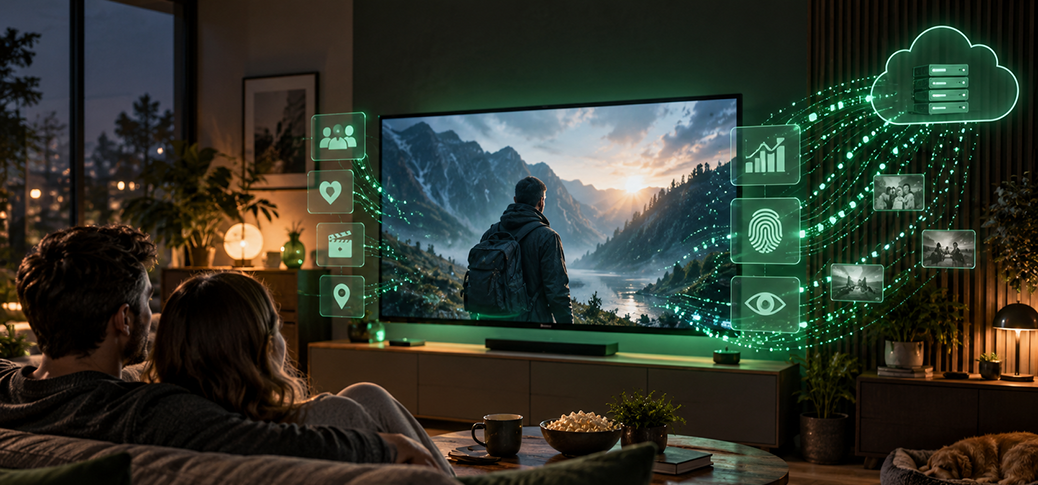
Normally, a blog post works its way toward the punchline – the surprise you didn’t see coming at the end. Today the punchline comes first: if you own a smart TV, you don’t own a television, you own a computer. And computers do computer things.
Everything you’ve learned about privacy and data protection deserves a second thought when it comes to a smart TV – especially since it sits in the one place where you feel least watched: the living room.
It’s evening, a movie is playing on the TV. Afterward, a vacation video off a USB stick – the coastline, the beach, the little hotel. No streaming app, no on-demand service, just your own footage on the screen. It feels harmless, because here the TV seems to be nothing more than a display. But precisely because no app is running, a false sense of security sets in: a connected TV can capture the vacation video from the USB stick too – with no app involved at all. How that’s technically possible leads us to the feature that makes it work.
How the TV recognizes the movie
The technology is called ACR (Automatic Content Recognition). It works much like the music-identification app Shazam: Shazam recognizes a song by comparing the pattern of a short audio snippet against known recordings. ACR applies the same principle to the picture on your screen.
What matters is where this feature lives: not inside a single streaming app, but one layer deeper, in the TV’s operating system. Yes, your screen has an operating system. Remember: computer, computer things.
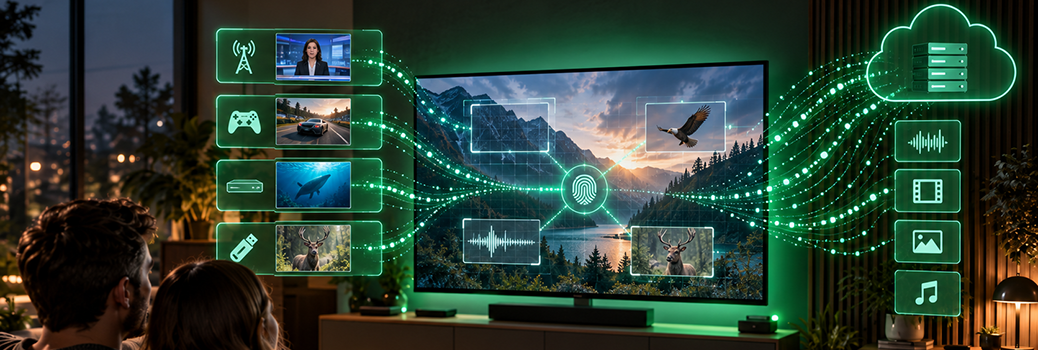
From features of the image, ACR continuously calculates a digital fingerprint – a compact string of numbers. That fingerprint is checked over your internet connection against a database of known movies, shows and commercials. When there’s a match, the content can be identified. Do this over and over, sometimes second by second, and you get a record of what played, when and for how long.
None of this requires transmitting a full video. The fingerprints are enough. And the result can be far more precise than “streaming app opened” – for example, “at 8:15 p.m. this specific movie started, and after half an hour a different show began.”
Because ACR works at the screen itself, it can capture every source of picture. That includes regular broadcast TV over antenna, cable or satellite, just as it does streaming. A game console or a DVD/Blu-ray player connected via HDMI – the standard connection for picture and sound – can be included too, and so can playback from a USB stick. The player itself doesn’t need internet access for this: the TV handles the capturing and the transmitting. So the apparent workaround of simply switching to a different picture source isn’t one.
That doesn’t mean every model analyzes every source. A 2024 study found, for instance, that the tested Samsung and LG sets showed no ACR transmission while certain streaming apps were in use. Switching your picture source, though, is still not reliable protection.
With a personal vacation video, there’s also a difference between capturing and recognizing. Home footage you shot yourself normally isn’t in the comparison database. So ACR can’t simply label it “your trip to the coast.” The on-screen image can still be swept into the capture, though. A USB stick doesn’t turn a TV that’s online into an offline device.
On many smart TVs, ACR is already running after the standard setup. There’s no single worldwide factory default, however: Samsung explicitly describes the feature in its support materials as optional and requiring consent. Anyone who blanket-accepts the additional services offered during setup may switch ACR on without realizing what the feature actually does. In the EU and the wider European Economic Area (EEA), the GDPR requires your consent for ACR, and you can withdraw that consent at any time. In the U.S., there is no comparable federal opt-in requirement – which is exactly why knowing the setting matters.
Why viewing data is worth money
Individual matches add up over weeks into a profile of your viewing habits. Someone who often watches travel programs gets sorted into different advertising audiences than a household that watches a lot of sports. The data also helps measure audience reach and how well commercials are delivered. It can be passed along to advertising partners and sold as data sets.
None of this requires your name sitting next to every movie title. Device identifiers – numbers used to recognize a particular TV – make it possible to tie the matches together and link them to advertising profiles. ACR can’t know for certain which person is actually on the couch. For the ad industry, the household’s interest alone can be enough. Transmitting fingerprints instead of videos therefore does not automatically make your viewing data anonymous.
This is the real point: we still think of the TV as a passive receiver. In reality it’s a networked computer that can send data to the manufacturer or its service providers even during ordinary television viewing. This content recognition needs no camera in the living room and no room microphone switched on. It’s about the program on the screen – no matter where it comes from.
In 2017, Vizio had to pay $2.2 million in a settlement with the Federal Trade Commission and the state of New Jersey, because it had collected and sold viewing data from roughly 11 million televisions without users’ knowledge or consent. The FTC specifically documented second-by-second capturing, including of DVD playback. This was a settlement, not a court verdict.

The switch is rarely labeled “tracking”
Content recognition can be turned off. The difficulty is often the name: instead of “turn off tracking,” you’ll find friendly-sounding additional services. It comes across as deliberate downplaying; the connection to ACR and advertising profiles is hard to spot from the label. Here’s what to look for:
- Samsung: “Viewing Information Services”
- LG: “Live Plus”
- Sony: “Samba Interactive TV”
- Vizio: “Viewing Data”
Open your settings and look in areas such as privacy, usage data or consent. Under the matching service, disable the data collection or withdraw your consent. Menu layouts and wording vary by model, model year and device software; if all else fails, your model’s manual will help.
Simply opting out of personalized ads may not be enough: the use of the data for advertising and the collection of the data can be separate settings. What matters is turning off the content recognition itself.
Regular TV and playback from connected devices generally stay possible. What may go away are features that rely on content recognition, such as matching extra information or recommendations.
If you don’t use voice control, turn that and the microphone off too, as far as your set allows. Some TVs have a physical switch for it. That’s a separate setting, independent of ACR.
Check again after updates
Firmware updates – updates to the software built into the TV – can reset your settings. Afterward, check again that your choices still apply, and read any new consent prompts before you accept them. That’s no reason to skip security updates, though.
The privacy options offered will shut down a large share of the officially disclosed data collection. What they can’t guarantee is total radio silence: some sets keep sending operational or diagnostic data. The streaming apps have their own privacy rules, too.
Even so, you’re not at the mercy of having your viewing habits analyzed. Once you know the right name, you can rein in that particular data collection deliberately – without having to master the fine points of television technology.
Did you find and switch off ACR on your TV? Tell us in the comments what the setting was called – ideally with the brand and model. It’ll help others track theirs down.
Comments