VPNs are touted as a digital silver bullet: browse anonymously, work securely at a café, stream Netflix from abroad. Provider advertising makes it sound like you’re defenseless online without a VPN.
But is that really true?
What a VPN actually is
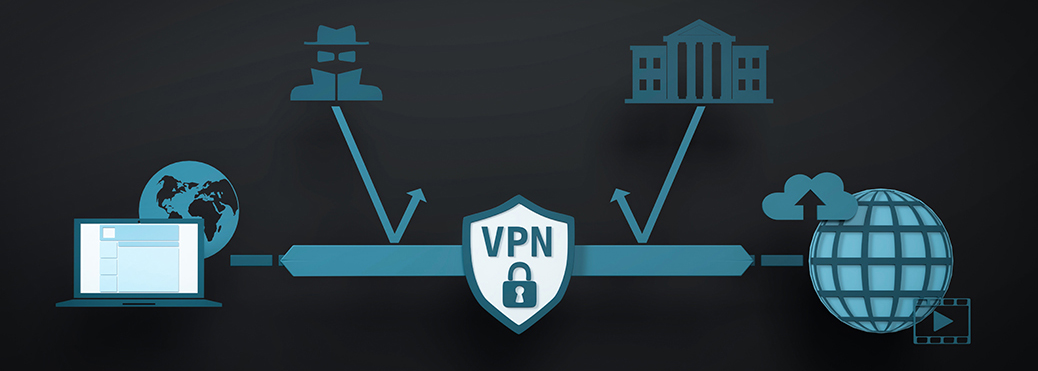
VPN stands for “Virtual Private Network.” The technology was originally developed so that employees could securely access their company network while on the road. The basic idea: an encrypted tunnel is established between your device and a server, through which all data traffic flows.
Think of it like an envelope: without a VPN, your postcard is readable by every mail carrier. With a VPN, the postcard is placed in an opaque envelope – at least on its way to the VPN server. Only there is the envelope opened and the postcard forwarded to the actual recipient.
When you activate a VPN, the following happens: your device establishes an encrypted connection to a server operated by the VPN provider. This server can be located in another country – in Frankfurt, New York or Tokyo. To the websites and services you subsequently visit, it appears as though you are browsing from wherever the VPN server is located. Your real IP address remains hidden, and your internet provider only sees that you are communicating with the VPN server – but not which sites you are visiting.
So much for the theory. In practice, the situation is considerably more nuanced.
What a VPN actually does
Let’s start with what a VPN genuinely does well. The following benefits are real and technically sound:
Protection on public Wi-Fi networks: This is the classic and strongest use case. When you use an open Wi-Fi network in a café, hotel or airport, in principle anyone on the same network can read your data traffic. A VPN encrypts the connection between your device and the VPN server – even if someone intercepts the data, all they see is encrypted gibberish. However, we need to be honest here too: since most websites have switched to HTTPS (recognizable by the lock icon in the address bar), a large portion of your data traffic is already encrypted even without a VPN. An attacker at a café can see that you are visiting your bank’s website, for example, but not what you are doing there. The VPN still adds an extra layer of protection because it also hides the domains you visit.
Masking your IP address: Your IP address reveals your approximate location and identifies your internet connection. With a VPN, websites only see the IP address of the VPN server. This makes it harder for website operators to track your browsing behavior based on your IP address. Nosy neighbors on the same network also can no longer see which sites you are visiting.
Bypassing geoblocking: Some content is only available in certain countries. With a VPN server in the respective country, you can pretend to be there. This works for streaming services, regional news outlets and sometimes even for cheaper prices in online shops. Whether this is legally acceptable is another matter, however – the terms of service of many streaming services explicitly prohibit the use of VPNs.
Protection from your internet provider: Without a VPN, your internet provider can see which websites you visit. In some countries, providers are even allowed to analyze or sell this data. A VPN prevents this: your provider only sees the connection to the VPN server. However, you are merely shifting your trust – from your internet provider to your VPN provider. More on that in a moment.
The biggest VPN myths
Now it gets interesting, because VPN provider advertising likes to tell stories that don’t hold up technically. Here are the most common myths:
Myth 1: “A VPN makes you anonymous on the internet.” This is perhaps the biggest exaggeration. Yes, a VPN hides your IP address. But your IP address is only one of many methods used to identify you online. As soon as you log into Google, Facebook, Amazon or any other service, that service knows exactly who you are – regardless of whether you are using a VPN or not. Furthermore, there are sophisticated tracking methods such as browser fingerprinting, cookies and advertising IDs that reliably identify you without knowing your IP address. A VPN protects against exactly one of these tracking vectors. That’s better than nothing, but far from true anonymity.
Myth 2: “With a VPN, you are safe from hackers.” A VPN encrypts your data traffic on its way to the VPN server. But it does not protect you from phishing emails, manipulated downloads, insecure passwords or security vulnerabilities in your operating system. If you click on a malicious link, no VPN will help you. The vast majority of cyberattacks on private users don’t target data traffic but rather human weaknesses: a careless click, a password that’s too simple, outdated software. A VPN is powerless against all of these.
Myth 3: “A VPN protects against viruses and malware.” No. A VPN is not an antivirus program. It does not check whether a downloaded file is malicious. Some VPN providers do bundle a rudimentary malware filter into their product, but that is more of a marketing gimmick than full-fledged protection. For real virus protection, you still need a dedicated security solution.
Myth 4: “My VPN provider doesn’t store any data – it says so in their advertising.” Almost every VPN provider advertises a “no-logs policy” – the promise not to store any data about your activities. In practice, this is difficult to verify. There have been cases where VPN providers handed over data to authorities despite such promises. Additionally, a VPN provider must at least temporarily process certain connection data to be able to deliver the service at all from a technical standpoint. Some reputable providers now submit to independent audits – that’s a good sign, but not a guarantee.
What to look for when choosing a VPN provider
If you have decided on a VPN, choosing the right provider becomes the crucial question. Because by activating a VPN, you are shifting a significant portion of your trust to the VPN provider. Your internet provider can no longer see what you are doing – but now the VPN provider can. In essence, you are swapping one middleman for another.
Here are the most important criteria:
Company headquarters and legal framework: Where is the provider based? Which country’s laws does it fall under? Providers in the EU are subject to the GDPR, which is generally an advantage. Providers in countries without strict data protection laws can theoretically handle your data more freely. On the other hand, providers in certain countries can also be compelled to hand over data without informing you.
Independent audits: Reputable providers have their infrastructure and no-logs policy regularly reviewed by independent security firms and publish the results. This is not a cure-all, but a significantly better sign than mere advertising promises.
Transparency: Does the provider publish a transparency report? How does it respond to government requests? Have there been security incidents in the past, and how were they handled? A provider that deals openly with problems tends to be more trustworthy than one that glosses over everything.
Business model: You should view free VPNs with particular caution. Operating VPN servers worldwide costs considerable money. If you’re not paying with money, you are most likely paying with your data. Some free VPN providers have been caught analyzing their users’ data traffic, injecting advertisements or reselling their users’ bandwidth. A reputable VPN comes at a price – typically between 3 and 10 euros per month.
Technical features: Look for modern protocols such as WireGuard or OpenVPN, a sufficient number of server locations and the ability to use the VPN on all your devices. A kill switch – a feature that immediately cuts off internet access if the VPN connection drops unexpectedly – is also important to prevent accidental unprotected browsing.

When a VPN is truly worth it
Now that we have outlined the possibilities and limitations, here is an honest assessment of who benefits from a VPN:
You frequently work on public Wi-Fi networks. Those who regularly work in cafés, hotels, coworking spaces or trains benefit the most from a VPN. The additional encryption layer protects against nosy fellow users and potential attackers on the same network.
You want to bypass geoblocking. If you travel abroad and want to access your home country’s media libraries – or conversely, access content from other countries while in your home country – a VPN is the tool of choice. Regional price differences for software or flight bookings can sometimes be exploited this way as well.
You value privacy from your internet provider. In some countries, internet providers are allowed to create browsing profiles and exploit them commercially. In Germany too, data retention remains a subject of ongoing political debate. A VPN can provide an additional layer of protection here.
You live in or travel to countries with restricted internet freedom. In countries with internet censorship, a VPN may be the only way to access free information. In such situations, a VPN is not a luxury but a necessity.
When you don’t need a VPN
Equally important is the question of when a VPN is unnecessary or even counterproductive:
You only browse at home on your own Wi-Fi. Your home network is generally already protected by your Wi-Fi password and your router’s encryption. A VPN adds little here but may slow down your connection since all data traffic has to take the detour through the VPN server.
You want to protect yourself from tracking by Google, Facebook & Co. As already explained: as soon as you log into a service, your identity is known. Ad blockers, privacy-friendly browsers like Firefox with strict tracking settings and mindful management of online accounts help against tracking – not a VPN.
You expect a speed boost. A VPN does not make your internet connection faster; in most cases, it makes it slower. After all, your data has to take a detour through the VPN server. Some providers advertise that a VPN can circumvent throttling by your internet provider – this only works in very specific cases and is not the norm.
You believe a VPN replaces other security measures. A VPN is one building block in a security concept, not the foundation. Regular updates of your operating system and software, a good antivirus program, strong and unique passwords, two-factor authentication and common sense are all more important than a VPN.
Practical tips for everyday VPN use
If you have decided on a VPN, here are some tips for daily use:
Don’t keep the VPN on all the time. For normal browsing at home, a VPN is usually unnecessary and only slows things down. Turn it on selectively when you need it: on public Wi-Fi, when accessing geo-blocked content or when handling particularly sensitive tasks.
Use the kill switch. Almost all reputable VPN providers offer this feature. The kill switch immediately disconnects your internet if the VPN fails. This prevents data from being transmitted unprotected without you noticing.
Test the speed. VPN servers vary considerably in their load and speed. If your connection becomes noticeably slower, try a different server location. Servers geographically close to you are generally faster than distant ones.
Check whether the VPN is working. After activating it, you can visit websites like whatismyipaddress.com to verify that the VPN server’s IP address is displayed and not your own.
Be cautious with browser extensions. Some VPN providers offer browser plugins that only tunnel browser traffic, not your computer’s entire data traffic. For comprehensive protection, you need the full VPN application.
Conclusion: a shield with limitations
A VPN is neither the digital silver bullet it is advertised as, nor is it useless. It is a specialized tool that provides real value in certain situations – especially on public Wi-Fi networks and when bypassing geoblocking.
At the same time, you should not be dazzled by the bold promises of advertising. A VPN does not make you anonymous, does not protect against viruses and is no substitute for mindful internet use. The most important protective measures cost nothing: keep software up to date, use strong passwords, don’t click on suspicious links and stay skeptical when something sounds too good to be true.
If after reading this article you decide that a VPN makes sense for you, invest in a reputable, paid provider with a verifiable privacy policy. And if you conclude that you don’t need one – that is an equally sensible decision. Not every tool is the right one for every craftsperson.
 Like
Like 
Apple uses more than just your IP address to identify you. They consider your Apple ID region, GPS, browser fingerprinting, and device IDs. A standard VPN only hides your IP, so Apple can still recognize you.
Thanks again for your honest feedback!